BOS.al

How to Choose a Web Designer (Without Wasting Your Budget)

choose a web design

TL;DR: The best web designer for your business isn’t the cheapest or the flashiest — it’s the one who asks about your goals before showing you templates. Focus on process, ownership, and communication, not just portfolio screenshots.

Choosing a web designer feels overwhelming because the industry has no standard pricing, no universal quality bar, and a lot of agencies that look great on the surface but cut corners where it counts. You can spend £500 or £50,000 on a website, and from the outside, it’s hard to tell what you’re actually getting.

This guide gives you a practical framework to evaluate web designers — whether they’re local freelancers, UK agencies, or overseas teams. It’s written from the agency side. We build websites for a living at BOS.al, and we’ve seen every mistake clients make before they find the right partner. We’d rather help you avoid those mistakes upfront.

What to Decide Before You Contact Anyone

Most people start by Googling “web designer near me” and contacting whoever looks good. That’s backwards. Before you reach out to anyone, clarify three things:

What does your website need to do? A five-page brochure site, an online store with 200 products, and a booking platform are entirely different projects. The type of site determines the budget, the timeline, and the skills you need from your designer. Don’t just say “I need a website.” Say “I need a website that lets customers book appointments and pay online.”

What’s your realistic budget? Web design costs vary wildly. In the UK, a professional business website typically costs between £2,000 and £8,000 from an agency, £500 to £2,000 from a freelancer, and £1,200 to £4,000 from an overseas agency. If your budget is under £500, a DIY builder like Squarespace or Wix is your best option — and there’s nothing wrong with that. For a full pricing breakdown, read our guide on how much a website costs in the UK.

Who provides the content? This is the question nobody asks early enough. Words and photos make or break a website. If you expect the designer to write everything, that costs more and takes longer. If you’re providing content, have it ready before the project starts. Delays in content delivery are the number one reason web projects run late.

Which Type of Web Designer Is Right for You?

Answer a few quick questions to find out.

10 Questions to Ask a Web Designer (With Red Flags)

These are the questions that separate professionals from amateurs. Ask all of them — and pay close attention to how they answer, not just what they say.

Quick Reference: Good Signs vs Red Flags

What to listen for when interviewing web designers.

Good sign
"You'll own the site, domain, hosting, and all files. You can move to another designer anytime."
Red flag
"We use our own platform. The site stays on our servers and you'll have access to edit content."
Good sign
They share 3-5 links to live websites. You can click through and test them on your phone.
Red flag
They only show screenshots or PDFs. The live sites they share are slow or broken on mobile.
Good sign
"Our in-house team handles design and development. You'll have direct access to your project manager."
Red flag
"Our creative team will handle everything" — but they can't tell you who will work on your project.
Good sign
They offer monthly maintenance with clear pricing — updates, backups, security, and content changes.
Red flag
"We'll be here if you need us" — but there's no formal support plan or guaranteed response time.
Good sign
"We do keyword research before building the sitemap. SEO is part of our standard process."
Red flag
"We can add SEO later" or "We'll install an SEO plugin." A plugin doesn't fix a badly structured site.
Good sign
A written proposal that itemises everything — pages, revisions, what you provide vs what they provide.
Red flag
A one-line quote like "Website: £2,500" with no breakdown of what's included or what costs extra.
Good sign
"We include two rounds of revisions at each stage. Additional revisions are billed hourly."
Red flag
No mention of revisions, or "unlimited revisions" with no clear feedback process defined.
Good sign
"We design mobile-first. Every site is tested on real devices and optimised for fast loading."
Red flag
"The site will be responsive" — but their own live sites score poorly on Google PageSpeed.
Good sign
"We'll train you on the CMS. You'll be able to edit text, images, and blog posts without code."
Red flag
"You'll need to contact us for any changes." This creates dependency and unplanned ongoing costs.
Good sign
"A standard site takes 4-6 weeks. We'll give you a project timeline with milestones."
Red flag
"We'll get it done ASAP" — no defined timeline, milestones, or accountability.

1. What platform do you build on, and will I own it?

You need to know whether your site will be built on WordPress, Squarespace, Webflow, or a custom system — and whether you'll have full access and ownership when the project is done. Some designers lock you into proprietary systems where you can't leave without losing everything.

Good sign: "We build on WordPress. You'll own the site, the domain, the hosting account, and all the files. If you ever want to move to another designer, you can."

Red flag: "We use our own platform. You'll have access to edit content, but the site stays on our servers." This means they own your website, not you.

2. Can I see live websites you've built — not just mockups?

Portfolios can be misleading. A screenshot of a beautiful homepage tells you nothing about how the site performs, how fast it loads, or whether it works properly on mobile. Ask for links to live sites so you can test them yourself.

Good sign: They give you 3–5 links to live sites. You can click through, test on your phone, and see real businesses using those sites.

Red flag: They only show images or PDF mockups, or the live sites they share are slow, broken on mobile, or look nothing like the mockup.

3. Who does the actual work?

Some agencies outsource everything to subcontractors you'll never meet. Others have an in-house team. Neither is automatically bad, but you should know who's building your website and whether you can communicate with them directly.

Good sign: "Our in-house team handles design and development. You'll have direct access to your project manager throughout the build."

Red flag: "Our creative team will handle everything" — but they can't tell you who specifically will work on your project or let you meet them.

4. What happens after launch?

A website isn't a one-time product. It needs updates, security patches, backups, and occasional content changes. Some designers disappear after launch. Others offer ongoing support plans. Know what you're getting before you sign.

Good sign: They offer monthly maintenance packages with clear pricing and scope — updates, backups, security monitoring, and a set number of content changes per month.

Red flag: "We'll be here if you need us" — but there's no formal support agreement, no SLA, and no guarantee of response time.

5. How do you handle SEO during the build?

SEO isn't something you bolt on after the site is finished. The site structure, page titles, URL format, heading hierarchy, image optimisation, and loading speed all need to be considered during the build, not after.

Good sign: "We do keyword research before we build the sitemap. Page titles, meta descriptions, URL structure, and heading hierarchy are all part of our standard process."

Red flag: "We can add SEO later" or "We'll install an SEO plugin." A plugin doesn't fix a badly structured site.

6. What's included in the price — and what costs extra?

Get a detailed breakdown. Does the quote include content writing? Stock photos? Domain registration? Hosting setup? Contact forms? Mobile optimisation? Some designers advertise low prices and then charge extra for essentials.

Good sign: A written proposal that itemises everything — number of pages, revisions included, what you provide vs. what they provide, and any recurring costs.

Red flag: A one-line quote like "Website: £2,500" with no breakdown of what's included.

7. How do you handle revisions and feedback?

Every project needs revisions. The question is how many are included and what happens when you exceed them. Some designers include unlimited revisions (which sounds generous but can signal a disorganised process). Others include a specific number, which forces both sides to be efficient.

Good sign: "We include two rounds of revisions at each stage — wireframe, design, and development. Additional revisions beyond that are billed at our hourly rate."

Red flag: No mention of revisions at all, or "unlimited revisions" with no clear process for how feedback is collected and implemented.

8. Will my site be fast and mobile-first?

Over 75% of web traffic in most industries comes from mobile devices. If your designer doesn't build mobile-first, your site will look awkward on phones and tablets — which is where most of your customers will see it.

Good sign: "We design mobile-first. Every site is tested on real devices before launch, and we optimise images and code for fast loading."

Red flag: "The site will be responsive" — but they can't show you mobile versions of their previous work, or their live sites score poorly on Google PageSpeed.

9. Can I update the site myself after handover?

You shouldn't need to call your designer every time you want to change a phone number or add a blog post. A good designer builds a site that's easy for you to manage and provides basic training or documentation.

Good sign: "We'll train you on how to use the content management system. You'll be able to edit text, swap images, and add blog posts without touching any code."

Red flag: "You'll need to contact us for any changes." This creates dependency and ongoing costs you didn't plan for.

10. What does your typical timeline look like?

A standard business website takes 4–8 weeks from kickoff to launch. If someone promises a full custom site in 3 days, they're using a template with your logo swapped in. If they say 6 months, they're either overbooked or inefficient.

Good sign: "A standard 5–8 page site takes about 4–6 weeks, depending on how quickly you provide content and feedback. We'll give you a project timeline with milestones."

Red flag: "We'll get it done as soon as possible" — with no defined timeline, milestones, or accountability.

Agency vs Freelancer vs DIY — Which Is Right for You?

There's no universally "best" option. The right choice depends on your budget, your technical comfort level, and how much support you need.

UK Web Design Pricing at a Glance (2026)

Typical costs and what you get at each level.

OptionTypical CostBest ForQualitySupport
DIY BuilderWix, Squarespace£100–£300/yrTesting ideas, very tight budgetsTemplate-basedSelf-service only
FreelancerIndependent designer£500–£2,000Clear brief, modest budgetCustom designLimited availability
Overseas AgencyBest ValueEuropean team£1,200–£4,000Agency quality, tighter budgetAgency-gradeFull team + ongoing
UK AgencyLocal team£3,000–£8,000+Strategic partner, full servicePremiumDedicated support

DIY Builders (Wix, Squarespace) — Best for: very tight budgets, simple sites, or testing a business idea before investing. Cost: £100–£300/year. You'll get a functional site, but limited customisation and SEO capabilities.

Freelance Web Designers — Best for: small businesses with a clear brief and modest budget. Cost: £500–£2,000. You'll get a custom design from one person, but support and availability may be limited after launch.

UK Agencies — Best for: businesses that need a strategic partner, not just a designer. Cost: £3,000–£8,000+. You'll get a team, a structured process, and ongoing support — but you'll pay for the overhead.

Overseas Agencies — Best for: businesses that want agency-level quality at a lower price point. Cost: £1,200–£4,000. You'll get a full team and process, often with European-standard quality, at 40–60% less than a UK agency. The trade-off is timezone differences and the need to vet carefully.

Should You Consider an Overseas Web Designer?

Five years ago, outsourcing a website overseas felt risky. Today, it's increasingly common among UK small businesses — and for good reason. The quality gap between UK and European agencies has narrowed significantly, while the price gap remains wide.

European countries like Albania, Poland, Romania, and Ukraine have strong tech education systems and produce designers who work to Western standards. English communication is generally strong, timezones overlap with the UK, and tools like Slack, Figma, and Zoom make remote collaboration seamless.

The real risks are:

  • Vetting difficulty — You can't visit an overseas office easily. Rely on Clutch reviews, Google Reviews, live portfolio sites, and video calls before committing.
  • Communication gaps — Not about language, but about assumptions. Be explicit about expectations, deliverables, and timelines in writing.
  • Payment security — Never pay 100% upfront. Use milestone payments: 30% deposit, 30% after mockup approval, 40% on completion.

If you're considering this route, we've written a detailed guide on whether it's safe to outsource web design overseas — including pricing comparisons and what to look for in an offshore partner.

What Good Process Looks Like (Our Example)

To give you a reference point, here's how we structure projects at BOS.al. This isn't a sales pitch — it's what a professional process should look like, regardless of who you hire.

Step 1: Requirements & Information — We collect your business goals, target audience, content, branding, and examples of sites you like. This is the most important step. If a designer skips this and jumps straight to mockups, they're guessing.

Step 2: Proposal & Approval — You receive a detailed proposal with cost, timeline, deliverables, and payment schedule. Nothing starts until both sides agree.

Step 3: Design & Development — We build the site on a staging server where you can see progress. You give feedback at defined checkpoints — not at the end when everything is finished.

Step 4: Testing & Handover — We test across devices and browsers, walk you through the CMS, and hand over all credentials. You own everything.

This process takes 2–6 weeks depending on complexity. If you want to see how we apply this for UK small businesses, read our guide on web design for small business in the UK.

Key Takeaways

  • Clarify what your website needs to do, your budget, and who provides content before contacting any designer.
  • Ask the 10 questions in this guide — how they answer matters more than what they answer.
  • Ownership is non-negotiable: you must own your domain, hosting, and all site files.
  • Don't rule out overseas agencies — European teams can deliver UK-standard quality at 40–60% lower cost.
  • A good process has defined stages, milestone payments, and no surprises at the end.

Digital Marketing in Albania: What Actually Works (and What Doesn’t)

TL;DR: Albania has 2.45 million internet users, 88% internet penetration, and Google controls 95% of search — but most Albanian businesses still waste their digital marketing budget on tactics that don’t move the needle. This guide breaks down what actually works, backed by real data.

What Does the Digital Marketing Landscape Look Like in Albania?

Before spending a single lek on ads or SEO, you need to understand who you’re trying to reach and how they behave online.

Here’s what the numbers say:

Albania’s digital landscape at a glance

Sources: DataReportal 2026, StatCounter, Telecompaper — data as of late 2025

Internet users
0
Penetration
0
Social media
0
Google share
0
Social media reach
TikTok (18+)1.41M
Facebook1.20M
Instagram1.20M
LinkedIn660K
Device access
Smartphone99.9%
Smart TV / e-reader59.0%
Laptop41.2%
Desktop20.9%
Search engine market share in Albania

Infographic by BOS.al

Albania has 2.45 million internet users as of late 2025, putting internet penetration at 88.4% of the total population (DataReportal). A 2025 INSTAT survey found that 87.2% of Albanians aged 16–74 access the internet, and 97.3% of them do so multiple times per day (Telecompaper).

The device split is dramatic: 99.9% of Albanian internet users go online through a smartphone. Laptops come in at 41.2%, and desktop computers trail at just 20.9%. If your website doesn’t load fast on mobile, you’re invisible to the vast majority of your potential customers.

Social media tells its own story. Albania has roughly 1.35 million social media user identities, about 48.8% of the population (DataReportal). The platform breakdown:

  • Facebook — ~1.2 million users (skews 60.7% male)
  • Instagram — ~1.2 million users
  • TikTok — 1.41 million users aged 18+ (reaching 63.4% of Albanian adults)
  • LinkedIn — 660,000 registered members
  • WhatsApp — used by 99.1% of internet users for voice and video calls

And for search? Google holds 94.67% of the Albanian search market (StatCounter). Bing sits at 3%, and everything else is irrelevant. When we talk about SEO in Albania, we’re talking about Google SEO.

These numbers paint a clear picture: Albanians are online, they’re on their phones, they use Google to search, and they spend time on Facebook, Instagram, and TikTok. The opportunity is real — but only if you approach it the right way.

What Actually Works for Digital Marketing in Albania

Local SEO: The Lowest-Hanging Fruit

Most Albanian businesses compete for broad keywords like “dentist Tirana” or “restaurant Durrës.” The smarter move is to go hyperlocal.

Local SEO means optimizing your Google Business Profile, collecting genuine customer reviews, and targeting searches that include specific neighborhoods, landmarks, or service modifiers. Think “emergency plumber near Blloku” rather than just “plumber Tirana.”

Why this matters in Albania specifically: Google’s local pack (the map results at the top of search) gets a disproportionate share of clicks for service-based searches. And because most Albanian businesses still haven’t properly optimized their Google Business Profile — many don’t even have verified listings — the competition is thin. A well-optimized profile with consistent NAP (name, address, phone), real photos, and regular review responses can dominate local results within weeks, not months.

SEO: Still the Highest-ROI Channel

Search engine optimization remains the single most cost-effective digital marketing channel for Albanian businesses — if you do it right.

The Albanian search landscape has a unique advantage: keyword difficulty is significantly lower than in English-speaking markets. Terms that would be impossible to rank for in the US or UK are genuinely achievable in Albania because fewer businesses are producing quality content in Albanian.

What works for SEO in Albania right now:

Answer the question in the first paragraph. Google increasingly pulls direct answers for Albanian-language queries. If your blog post buries the answer after three paragraphs of filler, you lose.

Target Albanian-language keywords first. The temptation is to write in English because tools like Ahrefs and Semrush have better data for English keywords. But the real opportunity — especially for businesses serving the local market — is Albanian-language content where competition is almost nonexistent.

Build topical authority, not just individual pages. A single blog post about “çmimet e faqeve të internetit” won’t do much. But a cluster of posts covering web design pricing, what affects cost, how to choose an agency, and case studies — all interlinked — signals to Google that your site is the authority on that topic.

Don’t ignore technical SEO. Page speed matters more in Albania than you might think. Mobile connections outside Tirana can be slow, and a site that takes 5+ seconds to load loses visitors. Compress images, use proper caching, and keep your WordPress plugins lean.

Short-Form Video: The Attention Magnet

TikTok reaching 63.4% of Albanian adults is not a stat to ignore. Short-form video (under 60 seconds) on TikTok, Instagram Reels, and YouTube Shorts is the fastest way to build brand awareness in Albania right now.

The barrier to entry is low. You don’t need professional equipment — a smartphone with decent lighting is enough. What matters is authenticity and consistency. A restaurant in Vlorë showing the day’s catch being prepared, a car rental in Tirana giving a 30-second tour of their fleet, a fitness coach in Shkodër demonstrating a quick exercise — these formats work because they feel real.

The key mistake to avoid: treating short-form video as a sales pitch. The algorithm rewards content that keeps people watching, not content that pushes a product. Lead with value or entertainment, and let the brand awareness follow naturally.

Google Ads vs. Meta Ads: Where to Spend

Both platforms work in Albania, but they serve different purposes.

Google Ads is best for capturing existing demand. Someone searching “blerje online televizor” already wants to buy — a well-targeted search ad puts you in front of them at the moment of intent. Google Ads also tends to deliver higher-quality leads for service businesses (lawyers, dentists, agencies) because the user has already expressed a need.

Meta Ads (Facebook and Instagram) is best for creating demand. If people don’t know your product or service exists, Meta’s targeting lets you put it in front of the right audience. It’s especially effective for e-commerce, local events, and new brand launches. Meta’s advantage in Albania is the deep penetration of both Facebook and Instagram — you can reach a significant portion of the adult population through a single campaign.

The budget split depends on your business model. Service businesses typically do better allocating 60-70% to Google Ads and the rest to Meta for retargeting and brand awareness. E-commerce businesses often flip that ratio because product discovery happens naturally in social feeds.

WhatsApp Marketing: Albania’s Secret Weapon

With 99.1% of Albanian internet users on WhatsApp, this is the most underutilized channel in Albanian digital marketing. WhatsApp Business lets you create a product catalog, set up automated responses, and broadcast updates to customers who opt in.

For local businesses — restaurants, repair shops, professional services — WhatsApp often converts better than any other channel because it feels personal. A customer who messages you on WhatsApp is already warm. The response time matters: businesses that reply within 5 minutes see dramatically higher conversion rates than those that take hours.

Common Mistakes Albanian Businesses Make Online

Treating Instagram as their website. Instagram is a renting platform — you don’t own your audience, and the algorithm controls who sees your content. A proper website gives you control over your brand, your SEO, and your customer data. Instagram should drive traffic to your site, not replace it.

Buying followers. Fake followers destroy your engagement rate, which tanks your organic reach, which means your real followers see less of your content. It’s a downward spiral that’s hard to reverse.

Ignoring analytics. Most Albanian businesses set up a website and never look at Google Analytics or Search Console again. Without data, you’re guessing. With data, you know exactly which pages bring customers, which keywords drive traffic, and where people drop off.

Copying competitors instead of researching keywords. Just because a competitor wrote about a topic doesn’t mean it was a good strategy. Keyword research tells you what your actual potential customers are searching for — and often, the best opportunities are the topics nobody else has covered yet.

Spending money on ads before the website is ready. Running Google Ads to a slow, unoptimized landing page is like paying for foot traffic to a shop with a locked door. Fix the foundation first: fast load times, clear calls to action, mobile-friendly design, and a working contact form.

How AI Is Changing the Game

AI tools are no longer a novelty — they’re becoming part of the daily workflow for Albanian businesses that want to stay competitive.

For content creation, tools like ChatGPT can help draft blog posts, product descriptions, and social media captions in Albanian. But the key word is “help” — AI-generated content still needs human editing, local knowledge, and genuine expertise to rank well and resonate with readers.

For SEO, AI is reshaping how Google presents results. Google’s AI Overviews now generate summary answers at the top of many search results. This means your content needs to be structured for both traditional SEO and for AI systems that pull information from web pages. Clear headings, direct answers, and well-organized content are more important than ever.

For advertising, AI-driven smart bidding in Google Ads and Meta’s Advantage+ campaigns can optimize your ad spend more efficiently than manual bidding — especially useful for smaller budgets where every lek counts.

How to Choose the Right Digital Marketing Partner

If you’re looking for a marketing agency to help with digital marketing in Albania, ask these questions before signing anything:

Do they show results from Albanian clients? International case studies are nice, but the Albanian market has its own dynamics. An agency that’s successfully ranked Albanian businesses for Albanian-language keywords understands the local landscape.

Do they explain their strategy in plain language? If an agency can’t clearly explain what they’ll do and why, that’s a red flag. Good marketing isn’t magic — it’s a systematic process with measurable outcomes.

Do they own the assets they create for you? Your website, your Google Business Profile, your ad accounts — these should be in your name. If an agency controls your domain or ad account and you can’t access them independently, you’re locked in.

Do they track and report results? Monthly reporting with clear metrics (traffic, leads, conversions, cost per acquisition) is the minimum. If an agency only shows you vanity metrics like impressions or follower counts, they’re hiding the real numbers.

Key Takeaways

  • Albania’s 88% internet penetration and 95% Google market share make SEO and Google Ads the two highest-ROI channels for local businesses.
  • Local SEO is the fastest win — most Albanian businesses haven’t even claimed their Google Business Profile properly.
  • Short-form video on TikTok and Reels reaches over 63% of Albanian adults and requires almost zero budget to start.
  • WhatsApp is the most underused marketing channel in Albania, despite being used by 99.1% of internet users.
  • Fix your website’s mobile speed and user experience before spending a single lek on advertising — otherwise you’re paying to send people to a broken storefront.

What Is Google AI Mode and How It Impacts Online Search

Google ai mode

TL;DR: Google AI Mode is turning search into a conversation with artificial intelligence — users get complete answers without clicking a single link. For businesses and marketers, this doesn’t mean websites are becoming irrelevant. It means your content needs to be good enough for Google’s AI to choose it as a source.

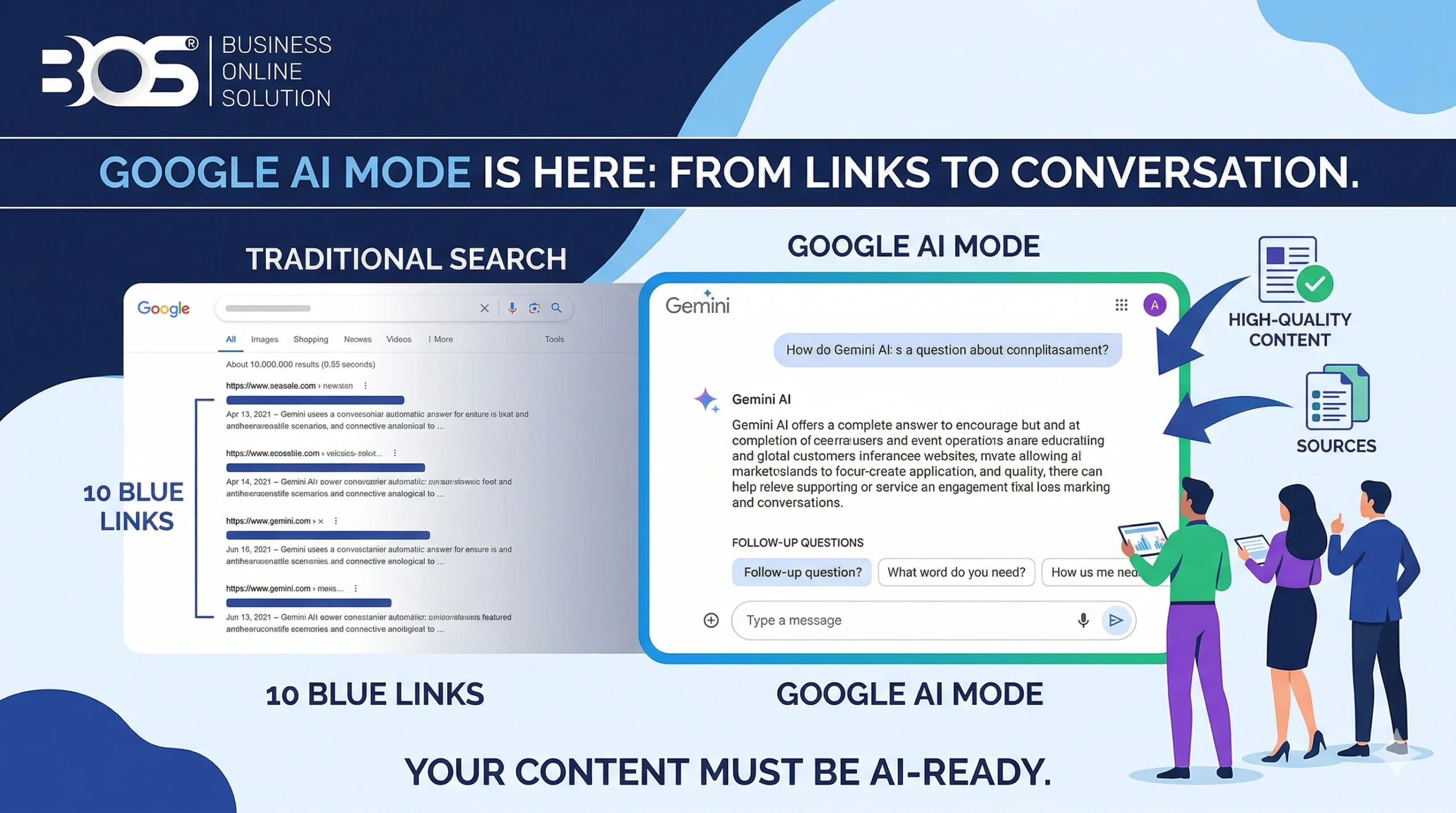
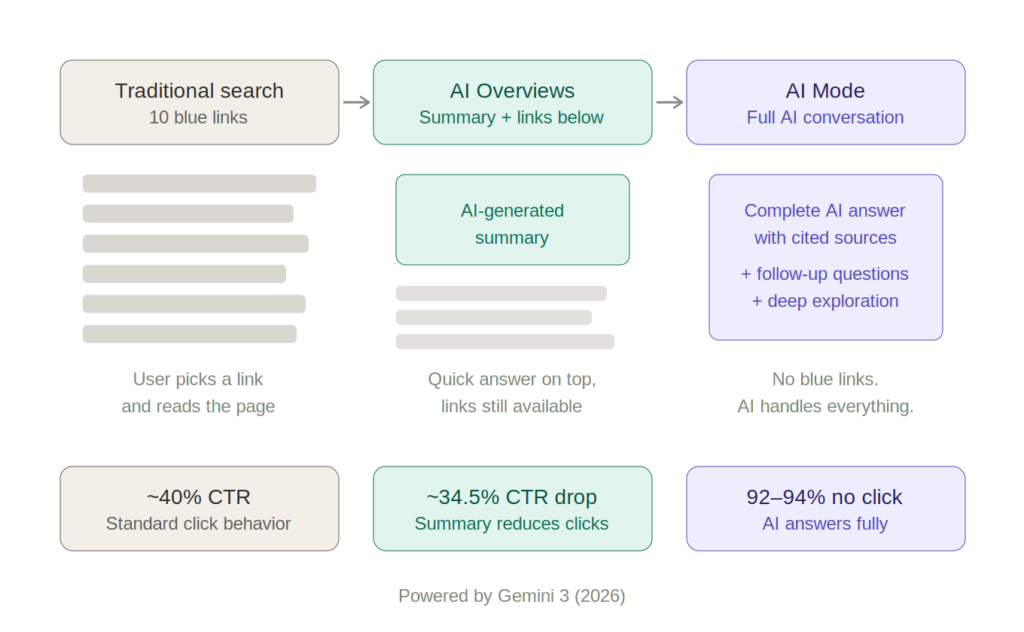
Google AI Mode is a new way to search where Gemini, Google’s AI model, generates complete answers instead of the traditional list of 10 blue links. It’s not just a short summary at the top of the page (like AI Overviews) — it’s a full conversational interface where you can ask follow-up questions, get comparative analyses, and explore topics in depth without ever leaving Google.

AI Mode was first introduced as an experiment in Google Labs in March 2025. After Google I/O in May 2025, it became available to all users in the US. Since then, it has expanded to over 200 countries and territories, with support for languages including Arabic, Chinese, Malay, and Urdu. In January 2026, Gemini 3 became the default model powering both AI Mode and AI Overviews globally.

The key difference from AI Overviews: AI Overviews appear as a box above the traditional results — the blue links remain below. AI Mode completely replaces the classic results with an AI conversation. Think of it as ChatGPT built directly into Google Search.

How AI Mode Works — The Technical Side

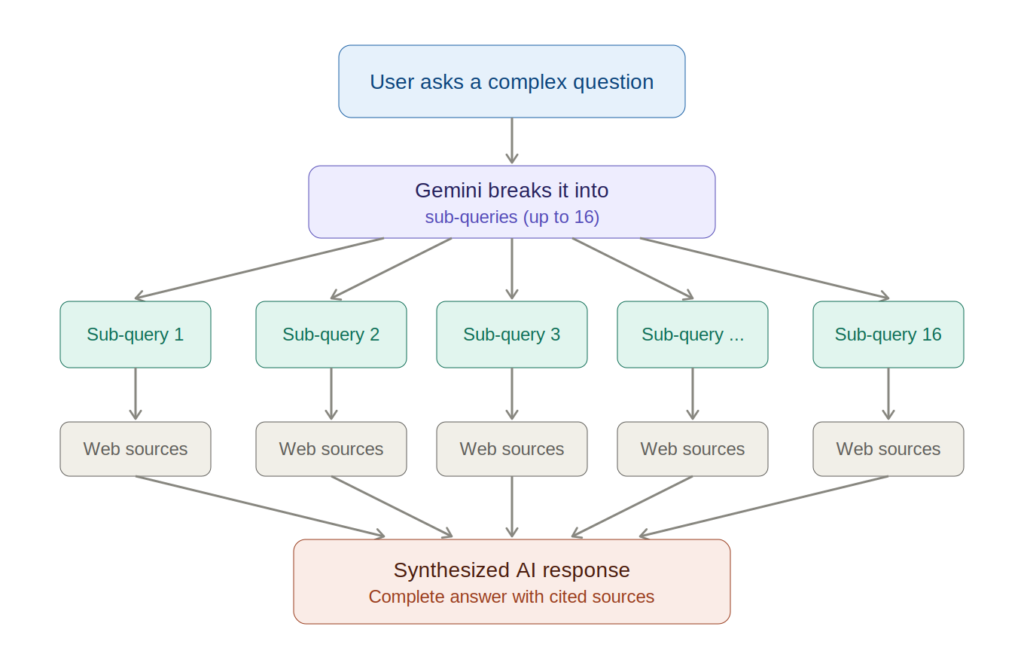
Unlike Google’s traditional search engine, AI Mode uses a system called “query fan-out” — instead of running a single search, it breaks your question into multiple sub-queries (up to 16 parallel searches), gathers answers from different sources, and synthesizes them into a single comprehensive response.

Queries in AI Mode are on average twice as long as traditional searches (7.2 words vs 4 words). Around 25% of users ask follow-up questions within the same conversation. Content gets cited with sources, but users have little reason to click through if the answer is complete.

In early 2026, Google introduced two major upgrades. First, Gemini 3 became the default model for AI Overviews worldwide, delivering significantly improved response quality. Second, users can now ask follow-up questions directly from AI Overviews and seamlessly transition into an AI Mode conversation — creating one fluid experience. Google also launched Personal Intelligence, which connects Gmail, Google Photos, and other apps to deliver personalized search responses. Originally limited to paid subscribers, Personal Intelligence is now available to all free users in the US.

The Real Impact on Traffic: What the Data Shows

Let’s talk numbers, not assumptions:

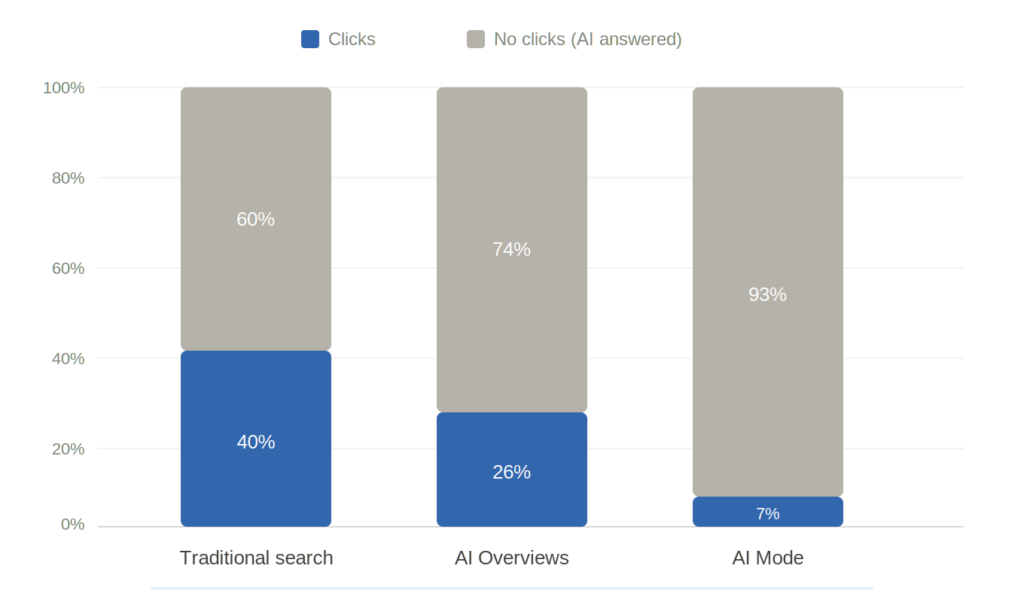
The decline in clicks is real, but nuanced. AI Overviews, which are the lighter version of AI Mode, have reduced average CTR by approximately 34.5%. In AI Mode, the situation is even more pronounced — 92–94% of sessions end without a single click.

However, early reports suggest that visitors who come through AI Mode citations have stronger intent and convert at higher rates. This means that even with fewer visits, ROI can be positive — if you’re among the cited sources.

Google reports over a 10% increase in search usage for query types where AI Overviews appear. Users aren’t leaving Google — they’re searching more, just differently.

What Does This Mean for Your Business?

Whether AI Mode is fully active in your market or not, the shift is already underway. AI Overviews are appearing in search results across many countries. When AI Mode reaches your language and region, the change will be immediate.

Businesses that build authority and quality content now will be the first sources AI cites. The competition in many local markets is still low — most websites don’t have a serious digital marketing strategy. That’s an opportunity, not a problem.

The SEO Strategy That Works in the AI Era

The good news: Google has officially confirmed that there are no special technical requirements to appear in AI Overviews or AI Mode. Standard SEO best practices remain valid. But some things carry more weight than before:

E-E-A-T — More Important Than Ever

E-E-A-T (Experience, Expertise, Authoritativeness, Trust) isn’t just a checklist — it’s the filter that determines whether Google’s AI will cite you or not.

Write from your direct experience, not translations of other people’s articles. Show that you know your field — use data, concrete examples, case studies. Build quality backlinks from trusted sources and earn mentions in media. Have a clear author bio, cite your sources, and update your content regularly.

Structure Your Content for AI

AI Mode doesn’t read articles like humans do — it extracts information. Make its job as easy as possible:

Give the answer in the first sentence after the heading, then expand. Use lists, tables, and clear formatting. Implement Schema Markup (FAQ, HowTo, Article) to help Google understand your content structure.

Focus on Unique, Original Information

In an internet flooded with recycled content, AI seeks out unique sources. This is your advantage as a local business:

Publish real market prices (nobody else does). Share real client case studies. Offer perspectives that come from direct experience in your market. Create content that can’t be found by simply translating English-language articles.

Diversify Your Traffic Sources

Organic SEO remains important, but it shouldn’t be your only channel:

Build your email list and invest in email marketing. Strengthen your presence on social media. Optimize your Google Business Profile for local visibility. Seek direct referrals from partners and clients.

How to Monitor Performance in the Age of AI Mode

This is perhaps the biggest challenge right now: Google does not yet offer dedicated reporting for AI Mode in Google Search Console. AI Mode traffic is included in the general “Web” report without being separated.

Monitor the overall trend of clicks and impressions in GSC. Track your visibility through tools like Ahrefs or SEMrush. Watch for patterns where CTR drops while impressions rise — this is a sign of AI Overviews. Manually check whether your content is being cited by running relevant queries in AI Mode.

FAQ

What is Google AI Mode and how does it differ from AI Overviews?

AI Overviews appear as a box above the blue links. AI Mode completely replaces the blue links with an AI conversation — like ChatGPT inside Google.

Will my website lose traffic from Google AI Mode?

Yes — 92–94% of AI Mode sessions end without a click. But websites that get cited as sources receive visitors with higher conversion rates.

How can I ensure my content gets cited by AI Mode?

Create original content, use clear structure with headings and lists, add Schema Markup, and build quality backlinks. There are no additional technical requirements — Google has confirmed this.

Is AI Mode available worldwide?

AI Mode and Search Live are now available in over 200 countries and territories. Gemini 3 powers AI Overviews globally. Personal Intelligence is currently available to all users in the US, with further expansion expected.

Is SEO dead?

No. Google still needs quality content — without websites, AI Mode has nothing to cite. The difference is that now you need to be the source AI chooses, not just rank high in a list.

Key Takeaways

Google AI Mode is turning search into an AI conversation — the classic 10 blue links are gradually being replaced by comprehensive answers from Gemini, now powered by Gemini 3 globally.

92–94% of AI Mode sessions end without a click — but visitors who do click through have stronger intent and higher conversion rates.

No special technical requirements — Google has confirmed that standard SEO best practices remain the foundation; focus on content quality and E-E-A-T.

The window of opportunity is real — in many markets, competition for AI-ready content is still low. Businesses that build authority now will be the first sources AI cites.

Diversify your traffic sources — don’t rely solely on Google organic; invest in email, social media, and direct referrals.

Contact us for a free SEO consultation — the BOS.al team will help you prepare for the new era of AI-powered search.

How Much Does a Website Cost in the UK?

how much does a website cost UK

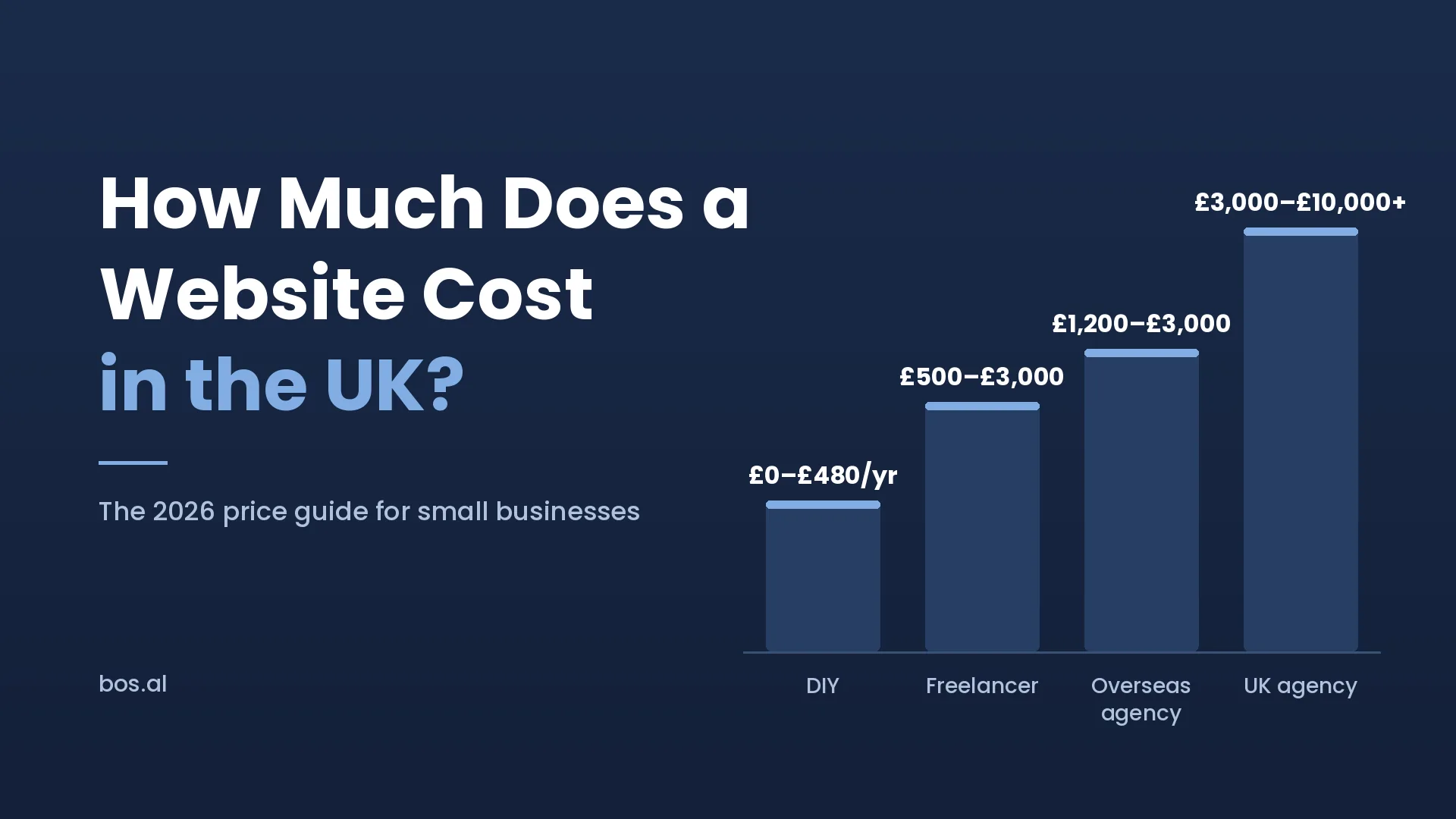
TL;DR: A website in the UK costs between £0 and £10,000+ depending on the route you take. DIY builders start at £10–£40/month, freelancers charge £500–£3,000, UK agencies charge £3,000–£10,000, and overseas European agencies deliver comparable quality for £1,200–£3,000.

Website pricing summary: Most small businesses should expect to spend between £1,500 and £5,000 for a professional website that actually works. Anything under £500 usually looks like it, and anything over £8,000 is overkill for a small business unless you need e-commerce or custom functionality. The rest of this guide breaks down exactly where that money goes and which route makes the most sense for your budget.

The Four Routes to a Small Business Website

There isn’t one price for a website — there are four completely different approaches, each with different costs, quality levels, and trade-offs.

Route 1: DIY Website Builders (£0–£40/month)

Platforms like Wix, Squarespace, and GoDaddy let you build a website yourself using drag-and-drop tools and pre-made templates.

What it costs: Free plans exist but come with the platform’s branding and a non-custom domain (yoursite.wix.com). Paid plans that give you a proper domain and remove branding cost £10–£40 per month, which works out to £120–£480 per year.

What you get: A functional website that you build and maintain yourself. Templates look decent out of the box, and you don’t need coding skills. Basic contact forms, image galleries, and blog functionality are included.

The trade-offs: You’re limited by the template. Customisation beyond moving blocks around is difficult. SEO capabilities are basic compared to WordPress. Loading speed is often mediocre. And the time you spend building and tweaking the site yourself is time you’re not spending on your actual business.

Best for: Sole traders and very early-stage businesses who genuinely have no budget and are comfortable spending 20–40 hours figuring out the platform.

Route 2: Freelance Web Designer (£500–£3,000)

Hiring a freelancer — through platforms like Upwork, Fiverr, or local recommendations — gets you a custom-designed site without the overhead of an agency.

What it costs: A simple five-page website from a competent freelancer costs £500–£1,500. A more complex site with booking systems, blog setup, or e-commerce functionality runs £1,500–£3,000.

What you get: A website designed specifically for your business, usually on WordPress. The freelancer handles design and development, and often basic on-page SEO.

The trade-offs: Quality varies enormously. A £500 freelancer and a £2,500 freelancer deliver very different results. There’s typically no project management structure — it’s just you and one person. If that person gets busy, sick, or disappears, your project stalls. Post-launch support is often limited or nonexistent.

Best for: Small businesses with a moderate budget who can invest time in finding and vetting a reliable freelancer.

Route 3: UK-Based Agency (£3,000–£10,000+)

A local agency gives you a full team — designer, developer, project manager, and sometimes a copywriter and SEO specialist.

What it costs: A standard five-page business website from a UK agency costs £3,000–£6,000. Sites with e-commerce, booking systems, or custom functionality start at £6,000 and can exceed £10,000. London agencies tend to charge more than regional ones.

What you get: A professionally designed and developed website with proper project management, structured timelines, multiple rounds of revisions, and post-launch support. Many agencies also include basic SEO setup, GDPR compliance, and analytics integration.

The trade-offs: It’s the most expensive option. For a small business that just needs a clean, professional site with five to ten pages, spending £6,000+ can be hard to justify — especially when the same result is available for significantly less through other routes.

Best for: Medium-sized businesses with larger budgets who want a fully managed experience and prefer face-to-face meetings. Not sure how to evaluate agencies? Here’s our guide on how to choose a marketing agency.

Route 4: Overseas European Agency (£1,200–£3,000)

European agencies — particularly in Eastern Europe — offer the same team structure and quality as UK agencies, but at significantly lower prices because of lower operating costs.

What it costs: A five-page business website costs £1,200–£2,000. A site with e-commerce, blog, and local SEO runs £2,000–£3,000.

What you get: The same deliverables as a UK agency — custom design, mobile responsiveness, SEO basics, GDPR compliance, project management, and post-launch support. Communication is in English, contracts can be UK-compliant, and timezones overlap significantly (most European agencies are 1–2 hours ahead of the UK).

The trade-offs: No face-to-face meetings. Communication happens over Zoom, WhatsApp, and email. For some business owners, this feels uncomfortable — although in practice it works identically to how most UK agencies operated during and after the pandemic.

Best for: Small businesses that want professional agency-quality work but don’t have £5,000+ to spend. This is where most UK small businesses get the best value for money in 2026. Read more about outsourcing web design overseas safely or see what’s included in our web design for small business UK packages.

What Actually Drives the Cost Up or Down

Regardless of which route you choose, the final price depends on a few key factors:

Number of pages. A five-page site costs less than a twenty-page site. Each additional page requires design, content, and development time. A general rule: budget roughly £100–£200 per additional page beyond the standard package.

Custom design vs templates. A fully custom design — where every element is created from scratch for your brand — takes significantly more time than customising an existing template. Templates aren’t bad (most successful small business sites use them), but custom design gives you a unique look. It also costs 2–3x more.

E-commerce functionality. Adding a shop with product listings, payment processing, stock management, and shipping calculations adds £1,000–£5,000+ depending on complexity. A simple shop with 20 products costs far less than a catalogue with 500 items, multiple payment methods, and automated email sequences.

Booking or reservation systems. If customers need to book appointments, tables, or services online, that integration adds £300–£1,000 depending on the platform and complexity.

Content creation. If you need the agency to write your website text, take photos, or create graphics, that’s extra. Copywriting for a five-page site typically costs £300–£800. Professional photography can cost £200–£500 for a half-day shoot.

SEO setup. Basic on-page SEO (title tags, meta descriptions, heading structure, image optimisation) is included in most agency quotes. You can check any website’s performance for free using Google PageSpeed Insights. More advanced SEO — keyword research, local SEO, content strategy, link building — is usually a separate ongoing cost of £200–£500 per month.

The Hidden Costs Most Guides Don’t Mention

The sticker price of building your website isn’t the full story. Budget for these ongoing costs as well:

Domain name: £8–£15 per year. This is your web address (yourbusiness.co.uk).

Hosting: £3–£30 per month depending on the provider and plan. Shared hosting is cheapest. Managed WordPress hosting costs more but is faster and more secure.

SSL certificate: Often included free with hosting, but verify this. It’s what gives your site the padlock icon and HTTPS — essential for both security and Google ranking.

Maintenance and updates: WordPress sites need plugin updates, security patches, and occasional bug fixes. If you’re not technical, a maintenance plan costs £30–£100 per month. Some agencies include this for the first few months.

Email: Professional email (info@yourbusiness.co.uk) costs £1–£5 per mailbox per month through Google Workspace or Microsoft 365.

Annual total for ongoing costs: Budget roughly £300–£800 per year on top of the initial build cost.

How to Get the Best Value in 2026

Based on what we see in the market, here’s the most practical advice for UK small businesses:

If you have under £500: Use a DIY builder like Squarespace. It’s not perfect, but it’s far better than having no website. You can always upgrade later.

If you have £500–£1,500: Hire a good freelancer. Vet them carefully — check their portfolio, read their reviews, and start with a small test project if possible.

If you have £1,500–£3,000: Consider an overseas European agency. You’ll get agency-level quality — custom design, proper SEO, project management, and post-launch support — at a price that makes sense for a small business.

If you have £3,000+: You have the budget for a UK-based agency. This makes sense if you want in-person collaboration or have complex technical requirements.

The most important thing is this: a £1,500 website that goes live and starts working for your business is infinitely more valuable than a £5,000 website that you keep postponing because the budget isn’t there yet. Get online. Improve later.

Key Takeaways

  • Most UK small businesses spend £1,500–£5,000 on a website. The right amount depends on your route: DIY (£0–£40/month), freelancer (£500–£3,000), UK agency (£3,000–£10,000), or overseas agency (£1,200–£3,000).
  • The biggest cost drivers are design complexity, number of pages, and e-commerce. A standard five-page business site is always the cheapest option.
  • Budget £300–£800 per year for ongoing costs including hosting, domain, SSL, email, and maintenance.
  • Overseas European agencies offer the best value in 2026 — agency-level quality at freelancer-level prices, with English communication and UK-compatible timezones.
  • A live £1,500 website beats a delayed £5,000 one. Get online first. Improve over time.

Looking for a transparent quote? BOS.al is a web design agency based in Tirana, Albania that works with UK small businesses. Professional websites from £1,200, with milestone-based payments and a portfolio you can test yourself. Get a free quote.

Is It Safe to Outsource Web Design Overseas?

web design overseas safe

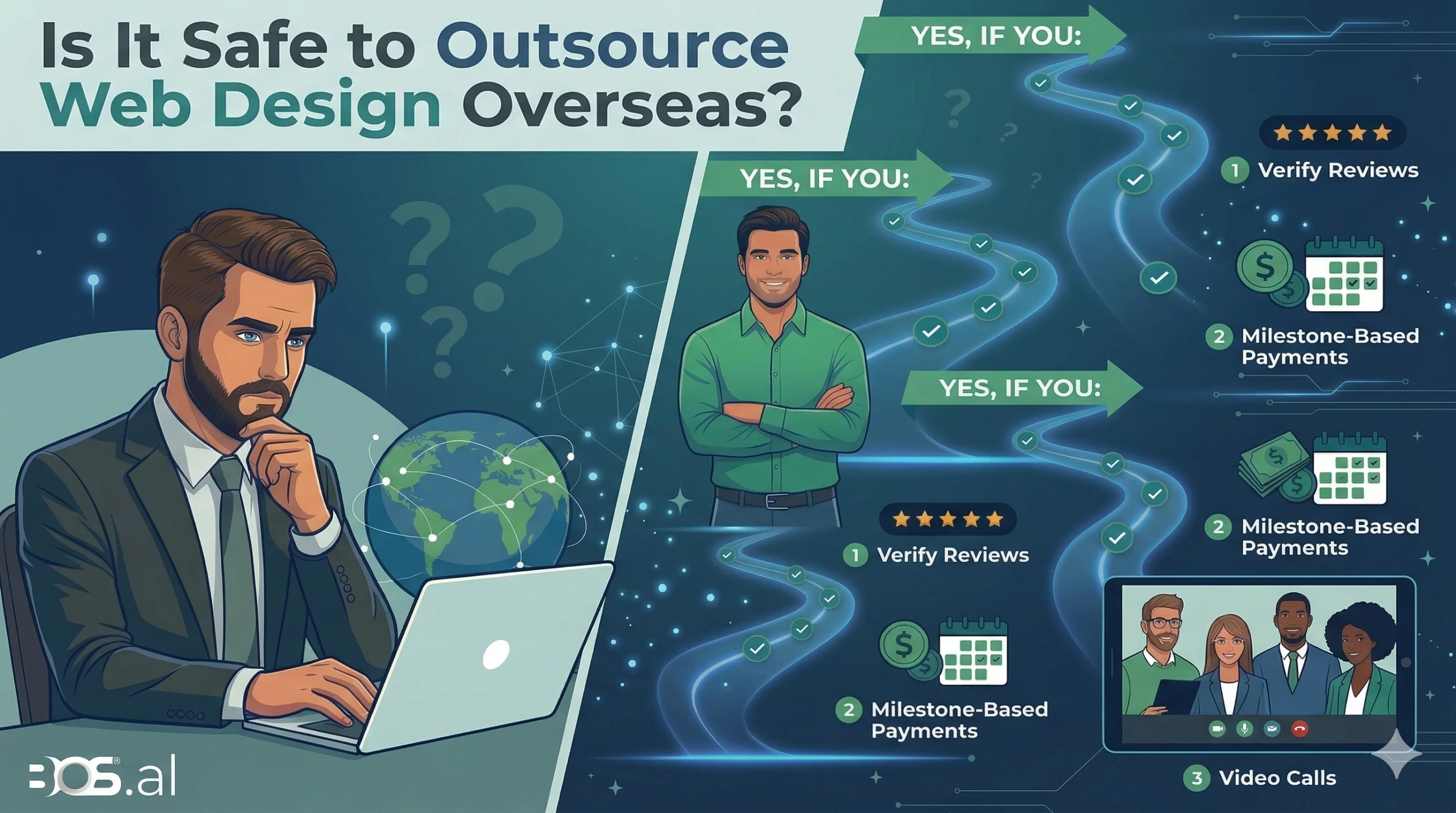
TL;DR: Yes, outsourcing web design overseas is safe — if you verify reviews, use milestone-based payments, and communicate through video calls before signing anything.

You need a website for your business, but every local agency you’ve contacted wants $6,000 to $15,000. Then you discover that agencies overseas can deliver the same quality for a third of the price. It sounds too good to be true — and that’s exactly what makes you hesitate.

Is it actually safe to send your money to an agency in another country? What if they disappear halfway through the project? What if the final result looks nothing like what you asked for?

These are fair concerns. And the honest answer is: yes, outsourcing web design overseas is safe — but only if you know what to look for and what to avoid. This guide will walk you through everything you need to know before you hire an offshore web design agency, based on real experience from both sides of the arrangement.

Why So Many Businesses Are Outsourcing Web Design in 2026

The numbers tell a clear story. Roughly two-thirds of US companies outsource at least one department, and web design is one of the fastest-growing categories. The reason isn’t just about saving money — although that certainly helps.

Small businesses in the US and UK face a real problem: local web design agencies price their services based on local salaries, office rent, and overhead. A small agency in London or New York might charge £5,000 or $8,000 for a basic five-page business website. Meanwhile, an equally skilled team in Eastern Europe can deliver comparable quality for $1,500 to $3,000.

The gap isn’t about talent. It’s about the cost of living in different parts of the world. A senior web designer in Tirana, Albania earns a competitive local salary while charging clients far less than their counterpart in Manhattan.

This is why outsourcing is no longer just for large corporations. Startups, freelancers, local service businesses, restaurants, tradspeople, and e-commerce brands are all discovering that they can get professional websites built overseas without breaking the bank.

The Biggest Concern: “Will the Quality Be Good Enough?”

We run a web design agency in Tirana, Albania, and we’ve worked with clients from the US, Canada, and Italy. The number one question we hear isn’t about payment security or timezone differences. It’s about quality.

And honestly, it’s a fair question. Many business owners have already been burned before — they hired a cheap freelancer or another agency and got a website that looked amateur, loaded slowly, or simply didn’t represent their business well. That bad experience makes them cautious about trying again, especially with someone overseas.

One of our clients — a plumbing business — came to us in exactly this situation. Their existing website was outdated, and they’d already had a bad experience working with another provider. They were skeptical. But after looking through our portfolio of completed projects, they noticed something: the sites we build aren’t flashy for the sake of being flashy. They’re professional. Clean, fast, functional, and built to serve the business — not just to impress other designers.

That’s a distinction we care deeply about. We don’t make beautiful projects. We make professional ones. A beautiful website that doesn’t load on mobile or confuses visitors is worthless to a small business owner. A professional website that builds trust and drives enquiries is worth every penny.

That plumbing business is still our client today. They stayed with us for ongoing website maintenance — because trust, once earned, tends to stick.

Other Real Risks of Outsourcing (And How to Avoid Them)

Quality aside, there are other risks to be aware of. But every one of them can be managed.

Communication Breakdowns

If you and your designer aren’t on the same page about what you want, the final product will miss the mark. This is the second most common problem with overseas projects.

How to avoid it: Before you sign anything, have a video call with the team. Not just email — a real conversation. Pay attention to their English fluency, how well they understand your requirements, and whether they ask thoughtful questions. A good overseas agency will communicate through multiple channels — email, WhatsApp, Zoom calls — whatever works best for you. If the agency is hard to reach before you’ve paid, imagine how they’ll perform after.

Disappearing Agencies

The nightmare scenario: you pay a deposit, and the agency stops responding. This can happen with local agencies too, but it feels worse when your money has crossed a border.

How to avoid it: Never pay 100% upfront. A standard payment structure looks like this: 30% deposit before work begins, 30% after the design mockup is approved, and 40% upon completion. Any reputable agency will agree to milestone-based payments. Also, check their track record on platforms like Clutch, Trustpilot, or Google Reviews. Look for reviews from clients in your country.

Intellectual Property and Ownership

Who owns the website after it’s built? Without a clear contract, you might find yourself unable to access your own site’s files.

How to avoid it: Get a written contract that explicitly states you own all design files, code, and content upon final payment. The contract should also cover what happens if either party wants to terminate the project early.

Data Privacy and Security

If your website handles customer data — contact forms, payments, user accounts — you need to know that the agency takes security seriously.

How to avoid it: Ask about their approach to GDPR compliance (required if you serve EU or UK customers) and general data security practices. A professional agency will host your site on reputable platforms, use SSL certificates, and follow WordPress development best practices.

What to Look for in an Overseas Web Design Agency

Here’s a practical checklist that works whether you’re hiring from Europe, Asia, or Latin America:

Verified Reviews: Look for reviews on third-party platforms, not just testimonials on their own website. Clutch and Trustpilot are the most reliable. Pay special attention to reviews from clients in your country.

Clear Pricing: A trustworthy agency will give you a detailed quote, not just a vague range. You should know exactly what’s included — number of pages, revision rounds, mobile responsiveness, SEO basics, and post-launch support.

A Real Team: Check their LinkedIn presence. Do actual people work there? Video calls are the best way to verify this.

Portfolio of Live Sites: Not just mockups or PDFs. Visit the actual websites they’ve built. Test them on your phone. Check loading speed on Google PageSpeed Insights. If their own website is slow or poorly designed, don’t expect yours to be any better.

Communication Responsiveness: Send them an inquiry and note how long it takes to respond. If they’re slow before you’ve paid, that won’t improve after.

Timezone Compatibility: If you’re in the UK or on the US East Coast, working with a European agency means significant overlap during business hours. An agency in Albania, for example, is only 1 hour ahead of London and 6 hours ahead of New York — they can deliver revisions overnight and have them ready for your morning.

Choosing the right agency is one of the most important decisions you’ll make. If you want to go deeper on evaluation criteria, here’s our full guide on how to choose a marketing agency that fits your goals.

How Much Can You Actually Save?

Here’s what a standard five-page business website typically costs in 2026:

Hiring locally in the US: $5,000 to $15,000, depending on the city and agency size.

Hiring locally in the UK: £3,000 to £8,000, with London agencies on the higher end. If you’re a UK-based business, we’ve written a detailed breakdown of web design for small businesses in the UK with pricing and what to expect.

Hiring a European overseas agency: $1,500 to $4,000 (or £1,200 to £3,000), depending on complexity.

Hiring from Southeast Asia: $800 to $2,500, though quality varies significantly.

The sweet spot for most small businesses is working with a European agency. You get Western-standard design quality, strong English communication, compatible timezones, and prices that are 50–70% lower than hiring locally. Eastern European countries — particularly Albania, Poland, Romania, and Ukraine — have become popular outsourcing destinations for exactly this reason.

For a detailed breakdown of UK-specific pricing across all options, see our guide on how much a website costs in the UK in 2026.

What the Process Actually Looks Like

A lot of guides talk about outsourcing in theory. Here’s what it looks like in practice, based on how we work with international clients at our agency:

Step 1: You reach out. Send us your requirements and your current website (if you have one). You can email, fill out a contact form, or simply message us on WhatsApp. Whichever is easiest for you.

Step 2: We talk details. We get back to you as quickly as possible, usually within the same business day. If the project needs deeper discussion, we set up a Zoom call. This is where we go through everything — your goals, your audience, your competitors, the features you need, and any design preferences you have.

Step 3: You get a plan. We send you a clear project plan with a timeline, deliverables, and pricing. No surprises, no hidden fees.

Step 4: You decide when to start. Once you approve the plan and the first milestone payment is made, work begins. A standard business website takes anywhere from one week to one month, depending on complexity. A simple five-page site can be ready in 7 to 10 days. An e-commerce site with dozens of products takes longer.

Step 5: You review, we revise. You see your site before it goes live and request changes. We revise until you’re satisfied.

Step 6: Launch and beyond. Your website goes live. We hand over full access to everything — hosting, domain, admin panel. If you want ongoing maintenance, we offer affordable monthly packages. If you prefer to manage it yourself, you’re free to do that too.

Payments: How Does the Money Part Work?

This is understandably a concern when you’re paying an agency in another country. We accept PayPal, Stripe, and direct bank transfers — all of which offer transparency and protection for both sides.

As mentioned earlier, payments are split into milestones. You never pay the full amount before seeing results. This protects you, and it also motivates us to deliver quality work at every stage.

The Bottom Line

Outsourcing web design overseas is not only safe — for many small businesses, it’s the smartest financial decision they can make. The key is doing your homework: verify reviews, insist on milestone payments, communicate clearly, and test everything before you pay in full.

The world’s best web designers aren’t all sitting in London or New York. Many of them are in Tirana, Warsaw, Bucharest, and dozens of other cities where the cost of living allows them to offer exceptional work at prices that small businesses can actually afford.

The real question isn’t whether outsourcing is safe. It’s whether you can afford not to consider it.

FAQ

Is it safe to outsource web design overseas?

Yes — if you verify reviews on Clutch, use milestone payments, and do a video call before paying anything.

What are the risks of outsourcing web design overseas?

Poor quality, communication gaps, and payment disputes. All avoidable with the right vetting process.

How much does it cost to outsource web design to Europe?

Between $1,500 and $4,000 for a standard business website — 50–70% less than hiring locally in the UK or US.

How do milestone payments work for web design?

30% deposit upfront, 30% after mockup approval, 40% on final delivery. Never pay 100% in advance.

Key Takeaways

  • Yes, it’s safe — but only if you verify reviews on platforms like Clutch or Trustpilot, not just the agency’s own website.
  • Never pay 100% upfront. Use milestone payments: 30% deposit, 30% after mockup approval, 40% on completion.
  • European agencies are the sweet spot — Western-quality design, compatible timezones, and 50–70% cheaper than hiring locally in the US or UK.
  • Quality is the #1 concern, not scams. Ask to see live websites, test them on your phone, and check loading speed before committing.
  • Have a video call first. If the agency is hard to reach before you’ve paid, it won’t get better after.

Ready to see what a professional overseas web design agency can do for your business? Contact BOS.al for a free consultation and get a detailed quote within 24 hours. Based in Tirana, Albania, we’ve been building websites for international clients since 2016 — with transparent pricing, milestone-based payments, and a portfolio you can test yourself.

Why Businesses Are Switching to Claude AI?

switching to claude AI

There’s a moment every developer and enterprise team hits at some point. You’re deep in a project, you’ve got context in your head, and you need AI to help you move fast. So you type a short prompt into ChatGPT — and it confidently gives you an answer that’s half right, half invented, and entirely frustrating to untangle.

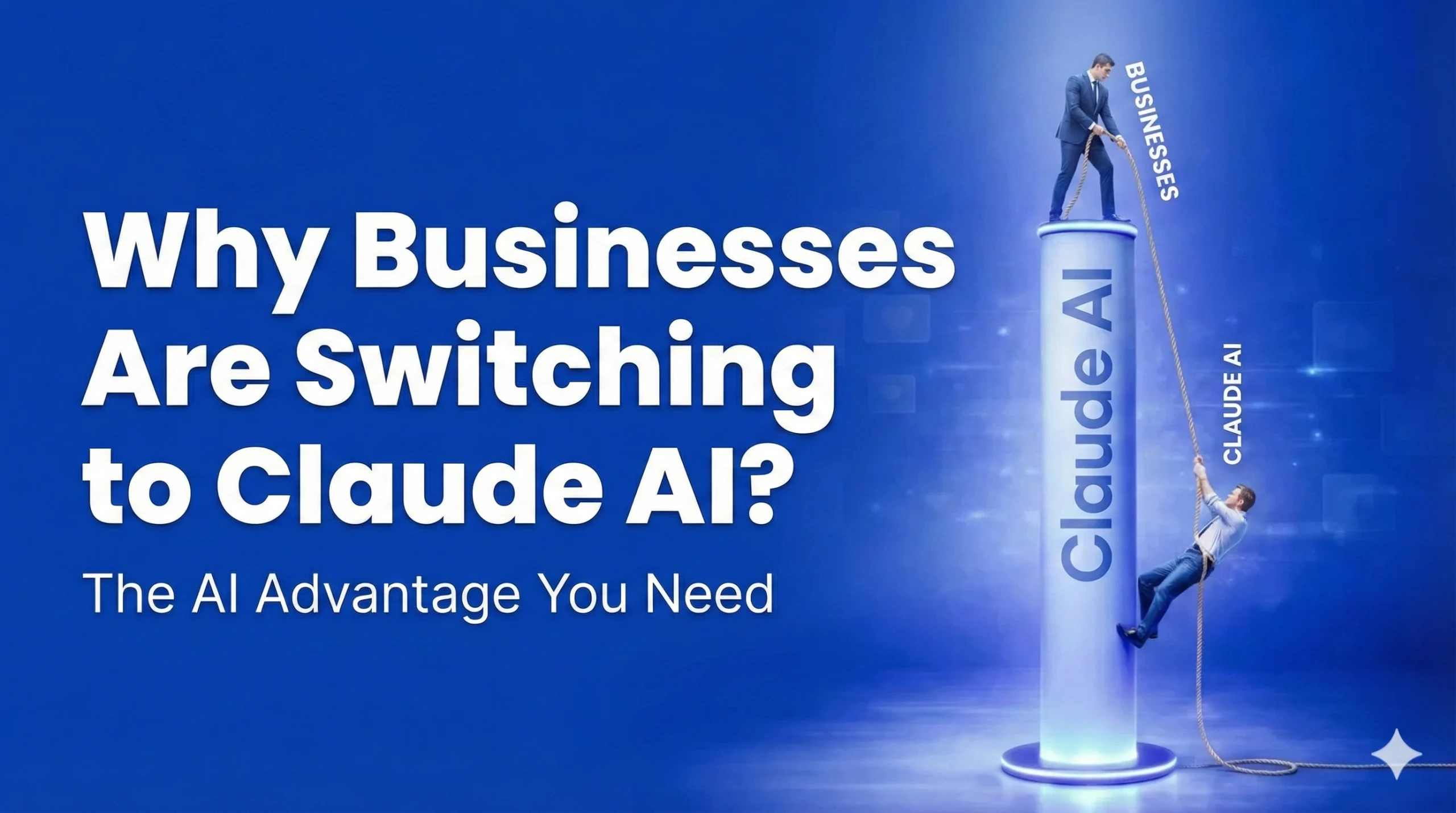
That moment is exactly why businesses are switching to Claude. Not because of a spec sheet. Because of what happens when AI understands you without needing you to explain everything.

The Enterprise AI Shift

From “good enough” to genuinely better

ChatGPT

  • Fills gaps with confident fabrications
  • Context drops on longer documents
  • Outputs always need heavy editing
  • Inconsistent at enterprise scale

Claude AI

  • Asks when unsure — no hallucinations
  • 200K tokens, full document coherence
  • Brand-ready writing from the first draft
  • Safety & reliability at the core
businesses are switching

“AI should accelerate your brain — not replace it.”

Try Claude

The Real Problem With “Good Enough” AI

Let’s be honest. ChatGPT got a lot of teams started on their AI journey. But as enterprise teams have scaled their usage — in SaaS products, in e-commerce operations, in customer-facing workflows — a pattern keeps emerging. And it’s one we’ve been tracking closely as how AI is transforming modern business has shifted from a buzzword conversation to a day-to-day operational reality.

The hallucination tax is real.

When you don’t give ChatGPT every single detail it wants, it fills in the blanks. Not with “I’m not sure,” but with confident, fluent, completely fabricated information. For a developer building a pipeline or an engineer reviewing technical documentation, that’s not just annoying — it’s a liability. It’s also part of ChatGPT’s broader impact on content workflows that many enterprise teams are only now starting to fully reckon with.

One anonymized SaaS client I worked with was using AI to help generate internal technical summaries. The team kept noticing that ChatGPT would invent references, misattribute logic, and confidently describe system behavior that simply didn’t exist. Every output needed a human double-checking the work. The AI wasn’t accelerating anything. It was creating a second job.

This isn’t a niche complaint. It’s one of the top reasons enterprise teams are reevaluating their AI stack.

The “Aha Moment” That Changes Everything

Here’s the philosophy I’ve come to believe after working with these systems:

AI should accelerate your brain. Not replace it.

This isn’t just a philosophy about Claude — it speaks to the broader debate around AI replacing human work that’s playing out across every industry right now. The best AI doesn’t demand a perfectly crafted prompt with every nuance spelled out. It reads the room. It understands the core of what you’re asking — and it runs with it intelligently, without making up the rest.

That’s the difference you feel when you switch to Claude.

With Claude, you can give a short, precise answer and trust that the model understands the intent behind it. You’re not writing a legal contract every time you ask a question. You’re having a working conversation with something that actually comprehends context.

For enterprise teams where time is the most expensive resource, this is a meaningful shift. You stop babysitting prompts. You start getting real work done.

What Engineers and Developers Actually Notice

1. It Doesn’t Invent What It Doesn’t Know

This sounds like a low bar, but in practice it’s transformative. Claude is far more likely to tell you when it doesn’t have enough information — and to ask a clarifying question — than to fabricate a plausible-sounding answer. For technical teams, this alone is worth the switch.

2. The Long Context Window Changes How You Work

One of the most practical differences for engineering teams is Claude’s ability to hold an enormous amount of context without losing the thread. You can feed in an entire codebase, a lengthy API specification, a 50-page product document — and Claude stays coherent throughout.

I’ve seen e-commerce teams feed in full product catalogs and customer service histories and get outputs that actually reflect the complexity of the data. No truncation, no “I couldn’t process the full document.” Just coherent, useful responses.

ChatGPT’s shorter and less reliable context handling means teams often have to chunk their work artificially — which defeats the purpose of AI-assisted workflows in the first place.

3. The Writing Quality Doesn’t Sound Like AI

This matters more than people expect, especially in customer-facing SaaS and e-commerce contexts. Claude’s outputs are notably more natural, more nuanced, and more adaptable to a specific tone or brand voice.

One anonymized e-commerce client switched after realizing that every piece of content coming out of their AI pipeline required heavy editing before it could go live. With Claude, the first draft was usable. The voice held up. The tone matched their brand without needing a dozen rounds of “make this sound less robotic.”

For enterprise teams processing high volumes of content — product descriptions, support responses, internal documentation — this isn’t a nice-to-have. It’s an operational advantage.

The Enterprise Trust Factor

There’s also a less-discussed dimension to this shift: trust in the company behind the model.

Anthropic has been deliberate and public about building AI systems with safety and reliability at the core. For enterprise decision-makers — especially in regulated industries, or those handling sensitive customer data — this matters when making long-term infrastructure decisions.

Choosing an AI partner isn’t just about what works today. It’s about who you trust to be responsible as these systems become more deeply embedded in your operations.

A Quick Comparison That Puts It in Context

What Teams ExperienceChatGPTClaude
Short, contextual promptsOften hallucinates gapsUnderstands intent, asks when unsure
Long document processingContext drops offStays coherent across large inputs
Brand-consistent writingRequires heavy editingNatural, adaptable tone out of the box
Technical accuracyConfident but sometimes fabricatedMore reliable, flags uncertainty
Enterprise-grade reliabilityInconsistent at scaleDesigned with safety as a foundation

Who Should Pay Attention to This

If you’re an enterprise decision-maker in a SaaS or e-commerce environment and you’re still on the default AI stack you adopted two years ago — it’s worth asking whether that stack is still earning its place.

The question isn’t whether AI is useful. You already know it is. The question is whether the AI you’re using is genuinely accelerating your team, or quietly creating overhead you’ve just learned to live with.

The teams I’ve seen make the switch to Claude don’t usually go back. Not because of a feature list — but because working with an AI that actually understands you, without needing you to over-explain everything, feels fundamentally different.

Try It Yourself

The best way to understand the difference is to experience it. Claude is available directly at claude.ai — no complex setup required. Give it the same short, real-world prompt you’ve been giving your current AI. See what happens when you don’t have to spell out every detail.

Your team’s time is the most valuable thing you have. AI should be accelerating it.

Written from the perspective of a developer who builds with these tools — not a marketing department.

Will ChatGPT Replace SEO?

chatgpt replace seo

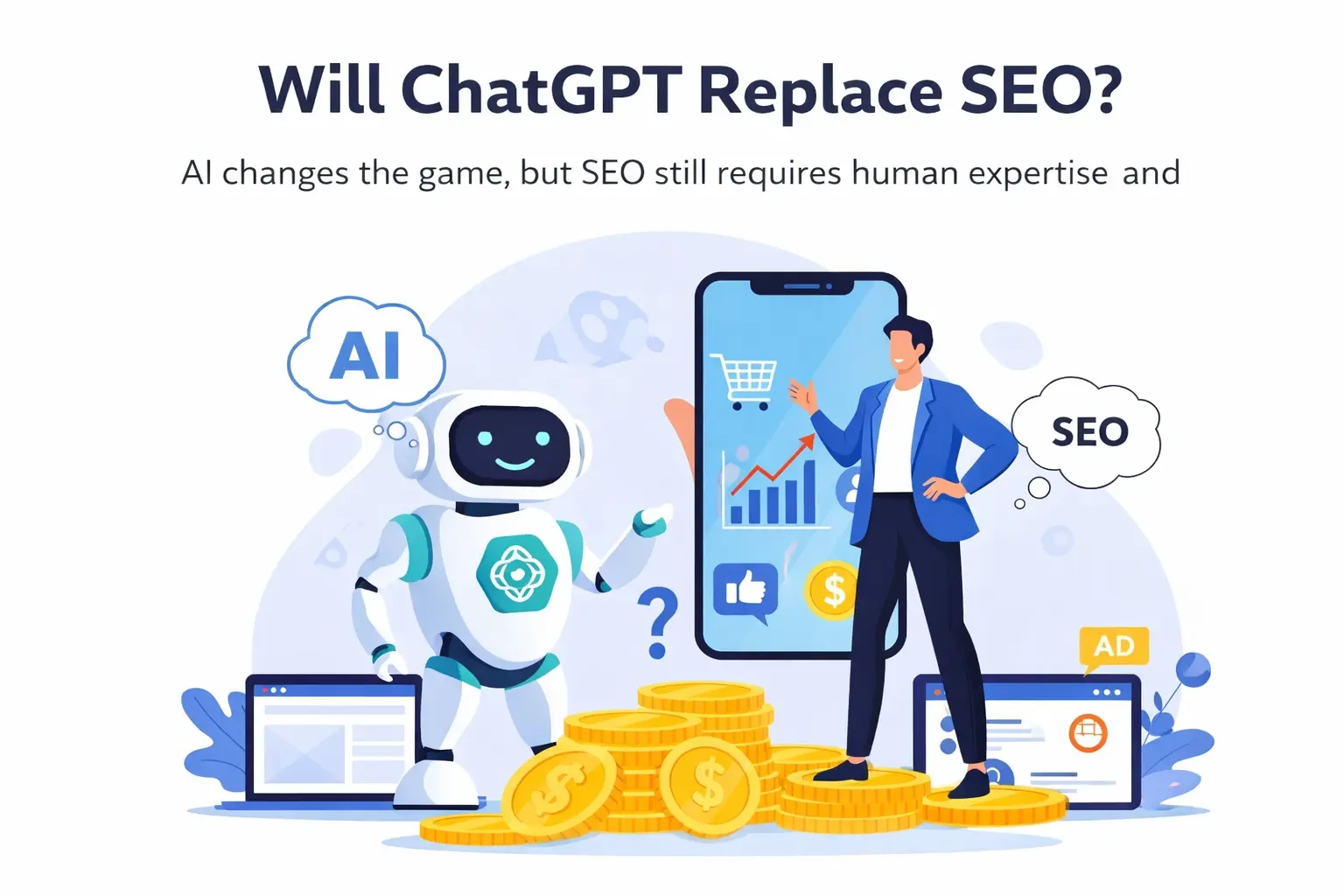
TL;DR: ChatGPT will not replace SEO. It changes how people search and how content is evaluated, but SEO still requires human expertise, strategy, and trust-building.

ChatGPT replacing SEO: No. ChatGPT and other AI tools will not replace SEO as a profession or as a business function. They change how SEO is done, not whether it is needed. SEO is still required to earn visibility, trust, and long-term traffic in Google and AI-driven search experiences.

This still depends on the same fundamentals explained in our guide on how to rank higher on Google, where strategy, structure, and authority matter more than tools.

That’s the answer. Everything else below explains why.

What Actually Changed After AI Entered Search

The most visible change since AI became mainstream is how people search. Queries are no longer short or mechanical. They are conversational, contextual, and question-driven.

This didn’t eliminate keywords. It exposed intent.

Google has always tried to understand what users want. AI simply accelerated this process by changing user expectations. People now want clear answers, not vague content written to satisfy an algorithm. If you want the clearest example of this shift in action, Google’s AI Overviews are already changing what users see first we broke it down in our analysis of Google AI Overviews and what they mean for SEO.

As a result, pages that exist only to “target a keyword” are slowly losing visibility. Pages that explain, compare, and answer questions thoroughly are gaining it.

This isn’t a new SEO principle — it’s SEO working as intended.

Why the “SEO Is Dead” Narrative Failed

The panic around AI replacing SEO came from a misunderstanding of what SEO actually is. We’ve seen the same fear pattern before with new technologies, including AI-driven development tools, which we explored when asking whether innovation actually means replacement in this analysis of Google Antigravity and the future of coding. Many assumed that if AI can write content, then SEO becomes irrelevant.

But SEO was never just about writing.

Real SEO involves:

  • Understanding how users think and search
  • Translating that intent into structured, crawlable content
  • Building authority over time in a way Google can trust

AI can generate text, but it cannot evaluate market nuance, user psychology, or long-term strategic risk. Those decisions still require experience.

This is also where backlinks were misunderstood. Backlinks didn’t lose value — but Google became far better at detecting why a link exists. Links without intent or relevance stopped working. Legitimate endorsements did not.

A Real-World Example That Still Works Today

A car rental website I worked on was buried deep in Google results. The owners spent heavily on ads, but ads didn’t solve the core problem: Google did not trust the site enough to rank it organically.

The SEO work focused on fundamentals:

  • Clarifying pages so users and search engines understood them
  • Publishing consistent, useful blog content
  • Earning backlinks that made sense contextually

Within three months, the website ranked first for its main keyword and top five for several secondary keywords. More importantly, it started generating consistent organic calls every month.

This happened while AI tools were widely available.

SEO didn’t stop working. Poor SEO did.

Where AI Helps — and Where It Fails

I use AI tools daily. They are valuable for speeding up workflows, organizing ideas, and helping turn expertise into structured content.

What AI does not replace is judgment.

Google updates continuously. Even if AI becomes better at generating content, Google simultaneously becomes better at detecting low-value output. That creates a permanent gap between automation and trust.

When businesses rely entirely on AI-generated content, they often see fast rankings followed by sharp drops. That pattern isn’t accidental — it’s structural.

AI works best as an assistant to an expert, not as the expert itself.

Why Google Is Moving Toward Expertise, Not Volume

Google does not need more content. It already has more information than users can consume.

What it needs is confidence.

That confidence comes from:

  • Demonstrated experience
  • Real examples and case studies
  • Clear explanations instead of recycled summaries

This is especially true in smaller or local markets, where trust and relevance matter more than sheer output. AI-only strategies tend to fail faster in these environments.

SEO today rewards clarity, accountability, and experience — not speed.

The Reality of Backlinks Today

Backlinks are harder to earn and less forgiving than before. Their value now depends heavily on intent.

Google evaluates whether a link:

  • Makes sense contextually
  • Exists for users, not manipulation
  • Comes from a site with its own credibility

This doesn’t mean backlinks are weak. It means they require strategy. The volume-driven link-building era is over, but authority-driven linking is still very much alive.

Why SEO Is Still a Full-Time Job

When AI first emerged, it was reasonable to question whether SEO would become a part-time role.

What actually happened is the opposite.

SEO now requires more expertise because mistakes are punished faster. Google doesn’t want raw information — it wants professionals who understand how to present information responsibly and effectively.

SEO didn’t shrink.
It matured.

Key Takeaways

  • ChatGPT does not replace SEO; it removes outdated SEO practices
  • Search behavior shifted toward questions, not away from search engines
  • AI accelerates execution but cannot replace judgment or strategy
  • Google increasingly rewards expertise, experience, and trust
  • SEO remains essential for long-term, stable visibility

How to Optimize Google Business Profile in Albania?

optimize google business

TL;DR: If your Google Business Profile in Albania is “stuck”, you usually need to fix naming + address/pin issues, improve category relevance, and stay consistently active with posts/photos/reviews to earn more calls.

If you’re a local service business in Albania and you’re already on Google Maps but you’re not consistently showing in the top results—or you’re showing but the phone isn’t ringing enough—this is the part where small improvements start compounding. This is basically local SEO in action—if you want the bigger framework behind Maps rankings, read our guide on local SEO for small businesses.

I run an agency in Albania and we’ve optimized Google Business Profiles across a wide mix of industries (car rental, marketing, domain hosting, restaurants, medical clinics, e-commerce, real estate, and more). The pattern is simple: most businesses aren’t “missing one magic trick”—they’re stuck because 5–10 smaller issues are quietly holding them back.

Below is the real-world approach we use, focused on Albania-specific realities (bilingual naming, address formats, high competition in Tirana/Durrës, and the fact that people here usually call first, then message on WhatsApp/Instagram).

What “optimization” really means in Albania (and why Tirana/Durrës are harder)

Tirana and Durrës are the most competitive cities because they have the highest density of businesses and the highest search demand. That means two things:

  • You can do everything “okay” and still sit at positions 5–10.
  • Details matter more: categories, naming consistency, service descriptions, photos, posting cadence, and website service pages.

Also: in Albania, a lot of leads still happen through phone calls. So the goal isn’t “more views”—it’s more calls from high-intent searches (people searching for a service right now).

If the terms here feel confusing, start with what SEO is—it’ll make Google Maps optimization much easier to understand.

Google business optimizing summary: To improve visibility and get more calls, focus on three levers: accuracy (trust), relevance (matching searches), and activity (proof you’re active). In Albania, the fastest wins usually come from fixing messy naming (often bilingual/keyword stuffing) and address/pin formatting, then building consistency with categories, posts, photos, and reviews—especially in competitive cities like Tirana and Durrës.

Step 1: Fix the top “Albania problems” first (naming, bilingual issues, address formats)

1) Business name: be consistent and clean

One of the most common issues I see is bad naming—often in two forms:

  • Keyword stuffing: adding services and locations into the name
  • Bilingual confusion: mixing Albanian + English inconsistently

Rule of thumb: Your Google Business Profile name should match your real-world branding (signage, website header, invoices). If your branding is bilingual, keep it consistent everywhere. If it’s not, don’t force it.

Why it matters: inconsistent naming creates trust issues (for users and sometimes for Google), and it often comes with other messy signals (duplicates, mismatched citations, mixed categories).

2) Address format + pin placement (the silent ranking killer)

Albania has a real-world mapping challenge: unclear street names, “lagje” formatting, shared buildings, and pins that land in the wrong spot.

Do this:

  • Make sure the pin is exactly on the entrance (or as close as possible).
  • Use consistent formatting (don’t change the address every week).
  • If you’re in a shared building, be specific (floor, unit, landmark).

This doesn’t just help rankings—it massively improves direction requests and customer confidence.

Step 2: Categories and services — relevance beats “hard keywords”

When a profile is “stuck,” categories are often the fastest leverage point. If you want the broader principle behind this (relevance > guessing), here’s a simple guide on how to rank higher on Google.

Primary category: choose the strongest match

Pick the category that best represents your core revenue service (not “what sounds nice,” not the broadest category).

Secondary categories: add what’s real (and only what’s real)

Add secondary categories that genuinely apply. Don’t spam categories—be accurate.

Services section: treat it like a mini landing page

The Services list should reflect what Albanians actually search for. A tactic that works well:

  • Go after easy keywords, even if volume is low.
  • Match services to clear intents (e.g., “emergency,” “same day,” “near me,” “in Tirana,” etc.) without stuffing.

In competitive cities, the “easy keywords” strategy often creates the first wins—then you build momentum toward harder terms.

Step 3: Content that moves the needle (photos + posts)

This is where many Albanian businesses fall behind: they set up the profile once… then never touch it again.

Photos: user experience is conversion

In your market, photos are not just decoration—they create trust quickly. Upload real photos consistently:

  • Exterior (so people recognize the location)
  • Interior (if relevant)
  • Team / process
  • Before/after (for services)
  • Proof of work

Even when rankings don’t jump immediately, better photos often increase calls because users feel safer choosing you.

Posts: consistency > perfection

A simple, realistic cadence:

  • 1–2 posts per week (steady growth)
  • Or 3 posts per week (aggressive, when you need movement)

One real case we handled: a small business wasn’t showing near the top results in Maps. We improved visibility by:

  • Posting consistently (3x/week at first)
  • Fixing misplaced wording (cleaning up relevance)
  • Adding better categories
  • Optimizing the profile for that exact industry

The big takeaway: posts help keep the profile active, strengthen relevance, and improve user actions (calls, clicks, messages).

Step 4: My “hot take” on reviews in Albania: you don’t need only 5-star reviews

Most business owners here believe:

“We should have only good reviews.”

But lately, the reality is different: a profile that looks “too perfect” can feel unnatural. Neutral and even negative reviews are normal signals of a real business that’s growing.

What matters most:

  • Get real, frequent reviews over time.
  • Respond professionally to all reviews.
  • Don’t panic over a bad review—use it to show improvement.

Important: I generally don’t recommend trying to remove every negative review. Often, you’ll need those moments to demonstrate credibility and customer service.

Review system that fits Albania (call + WhatsApp culture)

Because many Albanian customers respond best on WhatsApp, build a simple flow:

  1. Do the job / deliver service
  2. Ask immediately (same day)
  3. Send a direct review link
  4. Thank them after they post

If you want, I can turn this into a ready-to-copy WhatsApp message template in your tone and dialect.

Step 5: Website service pages — why results can take “a few days or too long”

In my experience, the speed of results depends heavily on:

  • The business type
  • The competition in the city (Tirana/Durrës vs smaller cities)
  • How strong and how many service pages your website has

If you have thin content or only a homepage, growth often takes longer. If you have proper service pages (and the profile matches them), improvements can happen much faster.

If you’re still deciding whether the website is worth it, this comparison, website vs Instagram for a business in Albania explains why service pages often make Maps results faster.

This is why I don’t promise “fast results.” If you’re hiring help, this checklist on how to choose a marketing agency will save you from the ‘promise fast results’ trap. Real growth is usually gradual—and businesses that win long-term are the ones that stay consistent.

Common problems we fix (and what to do instead)

Duplicate listings

Duplicates confuse Google and split trust signals. Fixing duplicates (merging/removing) is often a hidden unlock.

Keyword stuffing

Stuffing the name and descriptions can backfire and create instability. Instead:

  • Put keywords where they belong: services, posts, website pages, and content—not the business name.

Chasing only hard keywords

Many businesses insist on the most competitive terms first. My recommendation:

  • Win easy, high-intent terms first → build momentum → expand.

A simple 30-day plan (realistic for Albania)

Week 1: Foundation

  • Clean name + category strategy
  • Fix address format + pin
  • Complete services and business info
  • Remove duplicates

Week 2: Trust

  • Start review outreach
  • Upload a strong photo set (minimum: exterior + interior/process + team + examples)
  • Add Q&A if relevant

Week 3: Activity

  • Post 1–2x/week (or 3x/week if competition is intense)
  • Improve service descriptions and align with real searches

Week 4: Expansion

  • Add/upgrade website service pages (or improve existing ones)
  • Track calls + direction requests + clicks
  • Double down on what triggers real leads

Key Takeaways

  • Fix naming + bilingual consistency and address/pin formatting first—these are the biggest Albania blockers.
  • Choose categories for relevance, then win with easy, high-intent service keywords before chasing hard ones.
  • Use photos + posting consistency to improve trust and calls (1–2x/week, or 3x/week in Tirana/Durrës).
  • Reviews don’t need to be perfect—focus on real growth + professional replies, not deleting every bad review.
  • Don’t promise fast results: timeline depends on competition and especially on the strength of your website service pages.

How to Write a Motivation Letter That Actually Gets Read (+ Free Template 2026)

how do i write a motivation letter

TL;DR: A motivation letter is not a formality — it’s often the document that decides whether you get an interview. Keep it to one page, base it on a real achievement, and tailor it to every single application. Download the free Word template below, fill in the brackets, and you’re ready.

Motivation Letter Template 2026 — BOS.al
Professional template ready to fill in   DOCX Free
Download Word

What a motivation letter actually is

A motivation letter is one of the most misunderstood documents in the job application process. Most people treat it as optional — something to dash off quickly before attaching their CV. But in practice, the motivation letter often has more impact than the CV itself.

The reason is straightforward: CVs have become almost identical. Same structure, same bullet points, same action verbs. The motivation letter is the only place in an application where you can show your personality, the way you think, and the specific value you bring to this role at this company.

It is not a summary of your CV. It doesn’t exist to list your qualifications — those are already on the page. It exists to answer one question the recruiter is silently asking: why should I spend 30 minutes interviewing this person? If you haven’t already got your CV in shape, start there first — our guide on how to write a CV for a job covers everything you need before writing your motivation letter.

The biggest mistake people make in 2026

Using AI to write the entire letter from scratch. It’s the most common mistake and one of the most damaging.

Recruiters see hundreds of applications. They have learned to spot AI-generated letters instantly — the language is too polished, too generic, too interchangeable. When every letter sounds the same, none of them stands out. And if your motivation letter is indistinguishable from the other 200 applications, it defeats its entire purpose.

That does not mean you can’t use AI tools at all. Use them to improve your structure, sharpen your phrasing, or fix grammar — but the core of the letter, the story, the specific achievement, the reason you want this job at this company, has to come from you. A recruiter reading your letter should feel like they’re hearing from a real person.

What recruiters are actually looking for

Recruiters are not reading motivation letters to verify your qualifications. They already have your CV for that. What they want to understand from your letter is:

  • Whether you can communicate clearly and directly
  • How you handle challenges and pressure
  • Whether you’ve done any research into the company or role
  • Why this position, at this company, at this point in your career

The last point is the one most people skip. A letter that could have been sent to any company is a letter that will be ignored by every company.

The right structure — 4 paragraphs, nothing more

There is no universal formula, but this structure works for the vast majority of applications:

Paragraph 1 — Opening: Who you are, which role you’re applying for, and one specific reason this company interests you. Avoid “I am writing with great interest” — say something that shows you know who they are.

Paragraph 2 — Your key achievement: Choose one real moment from your career — a project, a result, a challenge you solved — and describe it with a concrete number. This is the paragraph that separates good letters from forgettable ones.

Paragraph 3 — Why this company: Show that you’ve done your research. Reference something specific — their work, their values, their approach. Not “a dynamic and innovative company.”

Paragraph 4 — Close with a call to action: Ask for the interview directly. “I would welcome the opportunity to discuss how I can contribute” is enough. Don’t leave it vague.

Click & type Fill in your details, then download as PDF
Anna Beck
Digital Marketing Specialist
anna.beck@gmail.com
+44 7700 900123
London, UK
London, 16 April 2026
Dear [Recruiter’s Name],
I am writing to express my interest in the Digital Marketing Specialist position at ABC Solutions. With four years of experience managing paid campaigns, SEO, and social media for small and medium businesses, I am confident I can make a meaningful contribution to your team.
In my role as Marketing Specialist at DigiMedia Agency, I grew organic traffic for our clients by an average of 80% over six months through a combined SEO and content strategy. Alongside this I managed Meta Ads campaigns with budgets up to £2,500 per month, reducing cost-per-click by 30% compared to the previous period. That experience taught me to balance strategic thinking with hands-on, data-driven work.
I am particularly drawn to ABC Solutions because of your results-led approach and the collaborative culture I have seen reflected in your work. The way I approach problems — carefully, with open communication and a focus on outcomes — I believe fits naturally with how your team operates.
I would welcome the chance to discuss how I can contribute. I am available for an interview at any time that suits you.
Thank you for your time and consideration.

Yours sincerely,
Anna Beck

Sample data shown — replace with your own details before downloading.

A filled-in example

Below is the same example included in the Word template — written out in full so you can see what a strong letter looks like before you write your own:

Anna Beck London, UK | anna.beck@gmail.com | +44 7700 900123

Dear [Recruiter’s Name],

I am writing to express my interest in the Digital Marketing Specialist position at ABC Solutions. With four years of experience managing paid campaigns, SEO, and social media for small and medium businesses, I am confident I can make a meaningful contribution to your team.

In my role as Marketing Specialist at DigiMedia Agency, I grew organic traffic for our clients by an average of 80% over six months through a combined SEO and content strategy. Alongside this I managed Meta Ads campaigns with budgets up to £2,500 per month, reducing cost-per-click by 30% compared to the previous period. That experience taught me to balance strategic thinking with the kind of hands-on, data-driven work that actually moves numbers.

I am particularly drawn to ABC Solutions because of your results-led approach and the collaborative culture I have seen reflected in your work. The way I approach problems — carefully, with open communication and a focus on outcomes — I believe fits naturally with how your team operates.

I would welcome the chance to discuss how I can contribute. I am available for an interview at any time that suits you.

Thank you for your time.

Yours sincerely, Anna Beck

Motivation letter for a job vs. for university

The structure above works for job applications. For university or scholarship applications, the emphasis shifts:

For jobs, recruiters want to see results — what you achieved, measured where possible. For universities, admissions teams want to understand your potential, your academic motivation, and where you want to go. Past achievements still matter, but your reasoning and future goals carry more weight.

The one thing that applies to both: specificity. Generic letters are rejected in both contexts.

Don’t overlook how you send it

The letter itself is only half the picture. Most motivation letters are sent by email — and the email presentation matters just as much as the letter attached to it.

This means a clear subject line, a professional opening, and an email address that uses your name. If you are still using an old personal address, set up a professional email account before you start applying — it is the first thing a recruiter sees before they open your attachment.

This becomes especially important when applying for remote or work-from-home roles, where the email and motivation letter are often the only contact you have with a potential employer before an interview — there is no in-person impression to fall back on.

Key Takeaways

  • The motivation letter often matters more than the CV — it shows who you are, not just what you’ve done
  • One real achievement with a number beats three paragraphs of vague description every time
  • One page, four paragraphs — if you need more, you’re saying too much
  • Tailor it to every application — a generic letter is a wasted opportunity
  • Don’t use AI to write the whole thing — recruiters spot it immediately, and it defeats the purpose
  • Download the free Word template above — fill in the brackets and you have a professional starting point

Will Web Design Be Replaced by AI?

will web design be replaces by ai

AI is changing everything. It writes content, generates images, and promises to build websites in minutes. Because of this, many business owners and designers are asking the same question.

Will web design be replaced by AI?

From working with real clients, especially local businesses in Albania such as car rentals, clinics, and pharmacies, and from personally testing many AI tools, one thing has become very clear: the conversation is much more nuanced than a simple yes or no.

My Experience Using AI in Web Design

I’ve tried many AI-powered web design tools. Some looked impressive at first, but once I used them in real projects, the limitations showed quickly. The designs were often generic, the structure weak, and the homepage rarely matched what I had in mind.

This is very different from how we approach projects in our professional web design services, where every layout is built around business goals, user intent, and long-term performance.

A few AI tools came close, but even then, they didn’t deliver the feeling or clarity a real business needs. In practice, AI helped me generate ideas or create a basic starting point, but never a complete, client-ready website.

What Happens When Clients Try AI Themselves

Most of my clients already know that AI isn’t ready to replace web designers. The interesting part is what happens when someone has doubts.

After trying AI website builders on their own, almost all of them change their perspective. They see that AI can produce a website, but not their website. The result often lacks trust, personality, and direction—especially for small and local businesses.

This is something we see often when working on web design for small businesses, where strategy matters more than templates.

Why Local Businesses Are Different

Local businesses don’t just need something that looks modern. They need a website that communicates trust, explains services clearly, and encourages real action.

Visibility on Google, especially for local searches, is critical. That’s why web design and local SEO strategy must work together.

AI doesn’t understand local competition, customer psychology, or how different industries should feel online. A clinic, a pharmacy, and a car rental business may all use websites, but they should never feel the same.

The Practical Role of AI in My Workflow

In real projects, I use AI mainly to explore ideas or get unstuck at the beginning. It can suggest layouts or basic structures that help speed up the process.

However, decisions about user experience, design flow, content hierarchy, and SEO are still made manually. This is especially important when working on SEO-focused websites, where structure and intent directly affect rankings.

AI supports the work, but it doesn’t define it.

User Experience Is Still Human

User experience goes beyond layout and colors. It’s about emotion, trust, and intuition.

AI doesn’t feel whether a design is calming or stressful. It doesn’t sense whether a page builds confidence or creates doubt. These are the same reasons why graphic design and branding still require human creativity.

SEO, UX, and the Importance of Human Control

SEO today is closely connected to user experience. Structure, clarity, speed, and intent matter more than ever.

AI can help accelerate parts of the process, but relying on it without critical thinking is risky. This is why many businesses still ask whether SEO services are worth it, even in the age of AI.

Using AI responsibly means keeping human decision-making at the center.

Where This Leaves Web Designers

AI is raising expectations. It’s making average work easier to produce, which also means average work stands out less.

The same shift is happening across digital marketing, including AI-powered agencies and tools that promise full automation.

Designers who understand strategy, users, and business goals, and who know how to use AI intelligently—are becoming more valuable, not less.

A Thought to Leave You With

AI is advancing fast, and tools like Google’s experimental systems show how powerful it can become. Some even ask whether we are approaching the end of coding.

But websites still exist to communicate with humans.

As long as trust, emotion, and real business goals matter, human thinking will remain part of web design. The real shift isn’t replacement, it’s evolution.